Your PDF never leaves this device

Mark it as yours,
before you send it out.

A word or your logo, stamped across the pages. Set the size, the angle and how much shows through, and the pages in front of you change as you do it. Nothing is uploaded.

Version 1.0, one file, nothing to install
Text or your logo
Over or behind the content
See it before saving
Works offline
vuiso.com/watermark-pdf/app
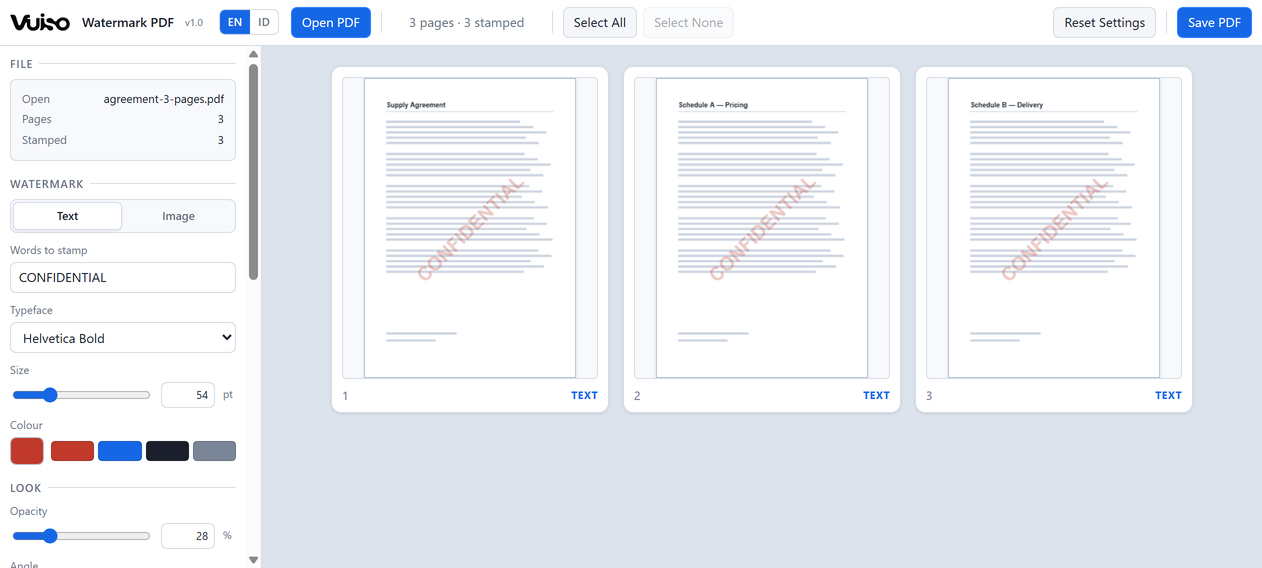
Vuiso Watermark PDF showing a three-page agreement with CONFIDENTIAL stamped diagonally across every page

Every setting redraws the pages immediately, so the mark is right before the file is written, not after.

What it does

A mark you can place,
not one you have to guess at

Text is drawn as text and a logo is embedded as it came, straight into the page, so the result stays sharp at any zoom or print size and the document underneath is left alone.

The preview is the measurement

The pages in the grid are laid out with the same font tables, the same page box and the same rotation the file is written with. A mark that fits on screen fits in the file - the preview is not an impression of the result, it is the same arithmetic.

Words or a logo

Type a word in one of six built-in typefaces, at any size, colour and angle. Or load a PNG or JPG - a signature, a stamp, a company mark. A PNG keeps its transparent background exactly as it came.

Over the content, or behind it

On top, where nothing can hide it. Or tucked under the page's own ink, which is what a scanned form usually wants - the words somebody has to read stay on top of the mark rather than under it.

One mark, or tiled across the page

Place a single stamp in a corner, an edge or the middle, with a margin you set. Or repeat it over a grid of rows and columns, so a document that gets cropped or photographed in part still carries the mark.

Every page, or the ones you name

All of them, only the ones you click, odd or even, or a range you type - 1-3, 7, 10- with a trailing dash for "to the end". A page that will not be stamped is greyed out and says so, so a range typed wrongly shows up before you save, not after.

Right way up on sideways scans

A scanned page usually carries a rotation of its own, so the page you see is not the page as it is stored. The mark is placed against what you see and translated onto the stored page, which is why a corner stamp lands in that corner and reads level.
Privacy

Not a promise.
Your file simply never leaves.

Most free online PDF tools send your file to somebody else's computer, then ask you to trust that it really was deleted afterwards. That is a strange bargain for a document you are marking CONFIDENTIAL. Vuiso does not work that way: everything happens inside your own device, exactly like opening a file in a program installed on your computer. Your file never leaves your machine.

The easiest way to check: switch off your Wi‑Fi or unplug your internet, then use it as usual. Everything still works. A tool that quietly sends your file to someone else's server could not do that. As an extra safeguard, the page is locked down from the start, so your own browser blocks anything that tries to send data out.

When you use Vuiso

  • Your file is opened and processed on your own device
  • The result saves straight to your own folder
  • Keeps working with the internet switched off
  • No file is ever sent over the internet
  • No account, no email, no sign-in
  • No copy of your file on our servers
Keyboard

The keys worth knowing

Clicking a page while "Every page" is set switches to "Selected pages" for you, and says so - otherwise the clicking would have done nothing.

Ctrl+O Open PDF
Click Select a page
Shift+click Select a run
Ctrl+click Add or remove one
Ctrl+A Select all
Esc Select none
Ctrl+E Save PDF
Get it

Vuiso-Watermark-PDF.zip

Version 1.00.9 MBChrome or EdgeWindows, macOS, Linux

Launch without downloading Download
Inside the archive
One folder holding Vuiso Watermark PDF.html (2.5 MB), HOW TO USE.txt, LICENSES.txt and the checksum file.
SHA-256 of the tool
D8E7756AFEAC99C67AC8EE48C585A3BBE5C34365D503A204A592C8501D4AF92A
Check it yourself
certutil -hashfile "Vuiso Watermark PDF.html" SHA256
  1. Unzip and open Double-click Vuiso Watermark PDF.html, or launch it here in the browser.
  2. Open a PDF Click "Open PDF", or drop the file onto the page area.
  3. Set the mark Type a word or load a logo, then set the angle, opacity and where it sits.
  4. Save "Save PDF" writes the file with the mark drawn onto it.

One file at a time. The mark is drawn into the page rather than attached as an annotation, so it cannot be clicked and deleted in a reader - but a watermark says who a document belongs to, it does not lock it. Bookmarks, links, form fields and searchable text all survive.

Buy me a coffee

Vuiso tools are free and always will be. If one saved you time, a coffee helps keep them maintained.

QRIS payment code
QRIS, Gerbang Pembayaran Nasional
ARTRA DIGITAL KREASI

Works from any Indonesian banking or e-wallet app.