Your PDF never leaves this device

Every page,
where you want it.

Drag pages into the order you need, drop the ones you do not, and slot another PDF in anywhere in the run. Nothing is uploaded.

Version 1.1, one file, nothing to install
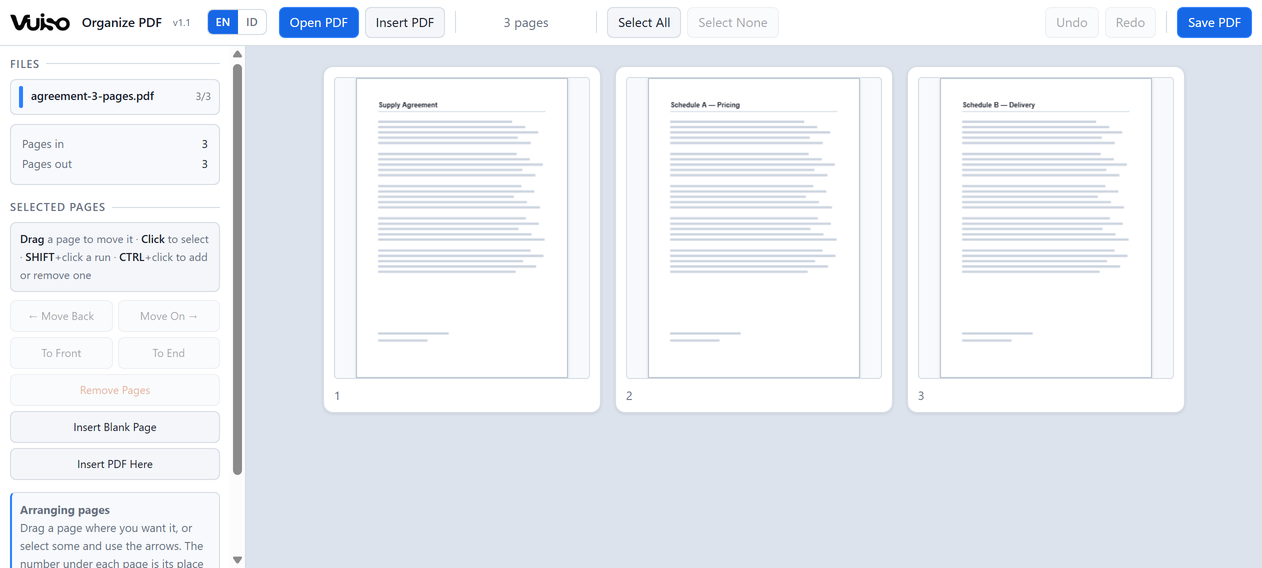
Drag pages into order
Insert another PDF
Remove pages
Works offline
vuiso.com/organize-pdf/app
Vuiso Organize PDF with an appendix inserted into a report, the three new pages selected and marked in their own colour

An appendix dropped into the middle of a report. Each document keeps its own colour, so it stays obvious which page came from where.

What it does

Arrange it once,
then save it

Pages are copied out of your original file exactly as they are, so an arrangement costs nothing in quality: text stays searchable, vectors stay sharp, images keep their own resolution.

Drag a page where it belongs

Pick a page up and a blue marker shows where it will land. It works the same with a finger as with a mouse. The number under each page is its place in the file you are about to save, so it renumbers itself the moment anything moves.

Move a whole run at once

Select several pages and drag any one of them: the rest travel with it and keep their own internal order. For longer journeys the arrows move a selection one place at a time, or all the way to the front or the end.

Insert another PDF anywhere

Insert PDF reads a second document and puts its pages in right after the selection — not at the end, which is what merging would do. Dropping a file onto the page area does the same thing.

Every source keeps a colour

Each open file carries a colour, shown beside its name and as a small bar under every page it contributed. Once two documents are shuffled together that colour is the only thing that says which page came from where.

Remove without touching the original

Removing takes pages out of what will be saved. Your files on disk are never opened for writing, so whatever happens here they cannot be damaged. Undo covers eighty steps of arranging.

Opens big documents immediately

Thumbnails are drawn only as they scroll into view, and the cache that holds them is capped, so a 200-page file does not sit on hundreds of megabytes of pictures you are no longer looking at.
Privacy

Not a promise.
Your file simply never leaves.

Most free online PDF tools send your file to somebody else's computer, then ask you to trust that it really was deleted afterwards. Vuiso does not work that way. Everything happens inside your own device, exactly like opening a file in a program installed on your computer. Your file never leaves your machine.

The easiest way to check: switch off your Wi‑Fi or unplug your internet, then use it as usual. Everything still works. A tool that quietly sends your file to someone else's server could not do that. As an extra safeguard, the page is locked down from the start, so your own browser blocks anything that tries to send data out.

When you use Vuiso

  • Your file is opened and processed on your own device
  • The result saves straight to your own folder
  • Keeps working with the internet switched off
  • No file is ever sent over the internet
  • No account, no email, no sign-in
  • No copy of your file on our servers
Keyboard

The keys worth knowing

Everything acts on the pages you have selected. Esc clears the selection, and Undo covers every arrangement you make.

Ctrl+O Open PDF
Ctrl+I Insert PDF
Drag Move a page
Ctrl+← Move back one
Ctrl+→ Move on one
Ctrl+Home Move to front
Ctrl+End Move to end
Shift+click Select a run
Ctrl+A Select all
Esc Select none
Delete Remove pages
Ctrl+Z Undo
Ctrl+Y Redo
Ctrl+E Save PDF
Get it

Vuiso-Organize-PDF.zip

Version 1.10.9 MBChrome or EdgeWindows, macOS, Linux

Launch without downloading Download
Inside the archive
One folder holding Vuiso Organize PDF.html (2.4 MB), HOW TO USE.txt, LICENSES.txt and the checksum file.
SHA-256 of the tool
FF048FB9287862F9B0AB4779C9BB819F9519AFB578B309C991159EFAAD185267
Check it yourself
certutil -hashfile "Vuiso Organize PDF.html" SHA256
  1. Unzip and open Double-click Vuiso Organize PDF.html, or launch it here in the browser.
  2. Open a PDF Click "Open PDF", or drop the file onto the page area.
  3. Arrange it Drag pages into order, remove what you do not need, insert another PDF where you want it.
  4. Save "Save PDF" writes every page in the grid, in the order shown.

This tool arranges pages. To join whole files end to end use Vuiso Merge PDF, and to turn pages that came in sideways use Vuiso Rotate PDF. Interactive form fields and digital signatures do not survive being copied into a new document, which is a limit of editing PDFs in general.

Buy me a coffee

Vuiso tools are free and always will be. If one saved you time, a coffee helps keep them maintained.

QRIS payment code
QRIS, Gerbang Pembayaran Nasional
ARTRA DIGITAL KREASI

Works from any Indonesian banking or e-wallet app.