Your PDF never leaves this device

Small enough to upload,
still sharp enough to read.

Tell it the size the form allows, 500 KB or 1 MB, and it finds the sharpest version that fits. Then compare every page with the original before you save. Nothing is uploaded.

Version 1.0, one file, nothing to install
Meets a size limit
Text stays searchable
Compare before saving
Works offline
vuiso.com/compress-pdf/app
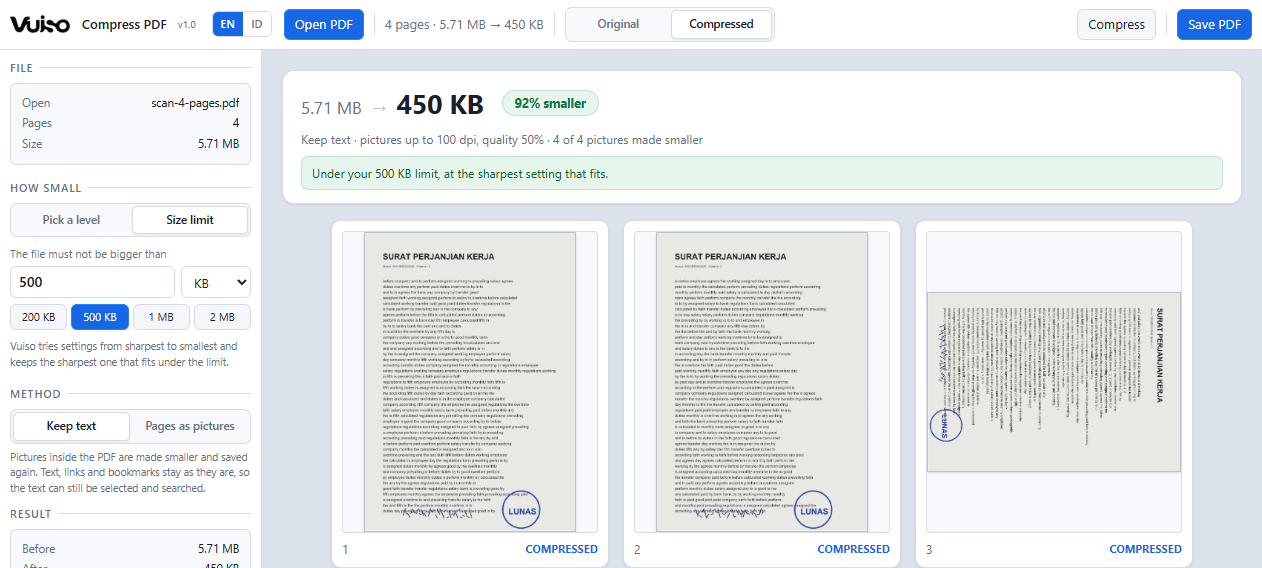
Vuiso Compress PDF showing a four-page scanned contract brought down from 5.71 MB to 450 KB, under a 500 KB limit

The size before and after sits above the pages it came from. Click any page to see it large.

What it does

As small as it has to be,
and no smaller

Every setting it tries is a real compression of your file, measured. What you save is a copy you have already looked at, page by page.

A size limit, not a guess

Type the limit the upload form gives, or pick 200 KB, 500 KB, 1 MB or 2 MB. Several settings are tried on your actual file, each one is measured, and the sharpest one under the limit is the copy you get.

Text stays text

Keep text makes the pictures inside the PDF smaller and leaves everything else alone. Fonts, links, bookmarks and form fields come through unchanged, and the text can still be selected, copied and searched.

Pages as pictures, when nothing else fits

Every page becomes one JPEG. It goes much further on drawings and stubborn scans, and the tool is plain about what that costs: text that can no longer be selected, and no links or bookmarks.

Check the small print first

Switch every page between Original and Compressed, open one large, zoom in, and press Space to flip between the two. You see what the person receiving it will see, before the file exists.

It tells you when it cannot

If a limit cannot be met, you still get the smallest copy it could make, marked as over the limit, with the next thing to try. If a file would not get smaller at all, there is nothing to save, and it says so.

Careful with what it does not understand

CMYK pictures, transparency masks and rarer image formats are copied across untouched rather than guessed at. A few kilobytes left on the table is a better deal than a colour shift in your document.
Privacy

Not a promise.
Your file simply never leaves.

Most free online PDF tools send your file to somebody else's computer, then ask you to trust that it really was deleted afterwards. That is a strange bargain for a contract, a payslip or a scanned ID you only wanted to squeeze under an upload limit. Vuiso does not work that way: everything happens inside your own device, exactly like opening a file in a program installed on your computer. Your file never leaves your machine.

The easiest way to check: switch off your Wi‑Fi or unplug your internet, then use it as usual. Everything still works. A tool that quietly sends your file to someone else's server could not do that. As an extra safeguard, the page is locked down from the start, so your own browser blocks anything that tries to send data out.

When you use Vuiso

  • Your file is opened and processed on your own device
  • The result saves straight to your own folder
  • Keeps working with the internet switched off
  • No file is ever sent over the internet
  • No account, no email, no sign-in
  • No copy of your file on our servers
Keyboard

The keys worth knowing

Space flips between the original and the compressed copy, in the page grid or in the large view. It is the quickest way to see whether the small print survived.

Ctrl+O Open PDF
Ctrl+Enter Compress
Ctrl+E Save PDF
Click Open a page large
Space Original or compressed
← → Previous or next page
Esc Close the large view
Get it

Vuiso-Compress-PDF.zip

Version 1.00.9 MBChrome or EdgeWindows, macOS, Linux

Launch without downloading Download
Inside the archive
One folder holding Vuiso Compress PDF.html (2.5 MB), HOW TO USE.txt, LICENSES.txt and the checksum file.
SHA-256 of the tool
BEFF0A7B11CA71544FFB1AF4B604A18ADC02F7B198ADC468DACA4275CE945A70
Check it yourself
certutil -hashfile "Vuiso Compress PDF.html" SHA256
  1. Unzip and open Double-click Vuiso Compress PDF.html, or launch it here in the browser.
  2. Open a PDF Click "Open PDF", or drop the file onto the page area.
  3. Say how small Pick a level, or type the size limit the upload form gives.
  4. Check and save Compare the pages, then "Save PDF" writes the smaller copy.

One file at a time. Keep text only changes the pictures inside a PDF, so a file that is mostly typed text is usually small already and may not shrink much. Password-protected PDFs cannot be opened. Your original file is never modified.

Buy me a coffee

Vuiso tools are free and always will be. If one saved you time, a coffee helps keep them maintained.

QRIS payment code
QRIS, Gerbang Pembayaran Nasional
ARTRA DIGITAL KREASI

Works from any Indonesian banking or e-wallet app.