A black rectangle drawn over text leaves the text underneath, and anybody can copy it out.
Here a page with a box is rebuilt from a picture of itself, so what was under the box is simply not in the saved copy.
Draw it on the page
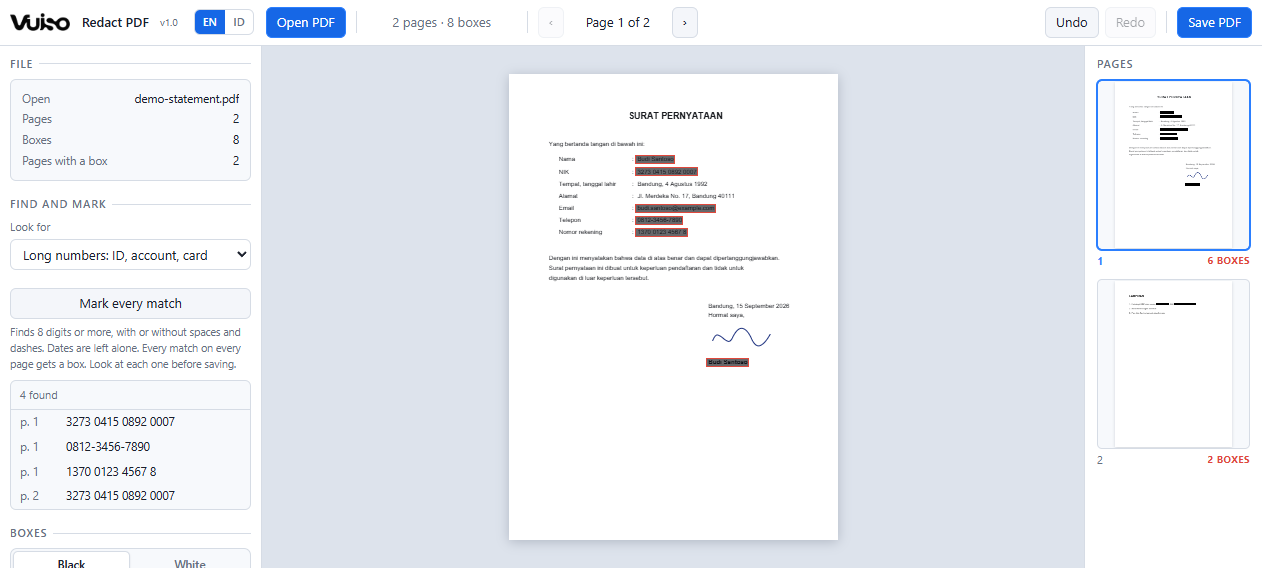
Drag a box over anything private, then move it, resize it by its handles or nudge it with the arrow keys. Boxes stay see-through while you work, so you can see exactly what each one covers, and the strip shows the boxes on every page.
Let it find the details
Type a name or a number and every match on every page gets a box. Or pick a ready-made search: long numbers such as ID cards, bank accounts and card numbers, email addresses, or phone numbers. Every match is listed, one click away.
Removed, not covered
When you save, each page with a box becomes a picture of itself with the boxes painted in. Its old text, images and form fields are deleted from the file, together with anything that earlier saves of the file left behind inside it.
Hidden data goes too
The title, author and keywords, the program that made the file, attached files and scripts are removed as well, unless you untick it. A form field on a rebuilt page is taken out together with the value typed into it.
Checked before you get it
The saved copy is opened again and searched once more for everything you marked. If something is still in it, you are told on which page before anything is downloaded.
Only the pages that need it
Pages without a box keep their text, links and bookmarks exactly as they were. Or rebuild every page, when the whole document should carry no text at all. Undo and redo cover every box.