Your PDF never leaves this device

Merge PDFs.
Drag them into order.

Add as many files as you like, drag the cards left or right until the sequence is right, and download one PDF. Nothing is uploaded.

Version 1.1, one file, nothing to install
Merge any number
Drag to reorder
No page limit
Works offline
vuiso.com/merge-pdf/app
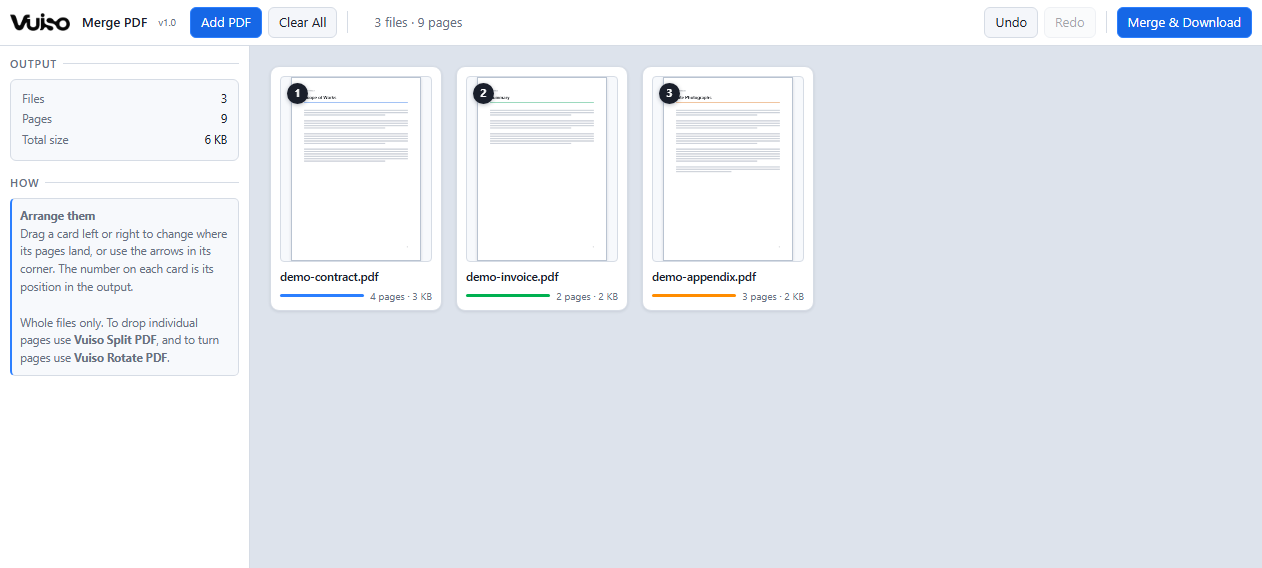
Vuiso Merge PDF showing three files as cards in output order, each with a cover thumbnail

One card per file, numbered in output order. Drag a card to move its pages; the cover tells you which file it is.

What it does

Files, in the order
you put them

Everything is drawn as vector and merged back into the original PDF, so it stays sharp at any zoom or print size, with labels that remain selectable, searchable text.

As many files as you like

Add them all at once or a few at a time, and keep adding after you have started. The same file can be added twice without the two copies interfering.

Drag to set the order

Grab a card and move it left or right; a marker shows where it will land. The arrows in each card's corner do the same thing one step at a time, and the badge on every card is its position in the output.

One thumbnail per file

Only the first page of each file is drawn, never every page. That is what keeps this tool cheap on a 300MB set, and it is enough to tell two similarly named scans apart while you arrange them.

Nothing is re-encoded

Pages are copied across as they are. Text stays text, vectors stay vectors, images keep their own resolution. A searchable PDF comes out searchable.

Gentle on memory

Source files are opened one at a time while the output is built and released before the next is read, rather than all of them being held open at once. A 300MB merge measured about 2.4GB at its peak, and produced a correct file.

Undo the arrangement

Every move is undoable, so trying an order costs nothing. Removing a whole file asks first, because that is the one step undo does not cover.
Privacy

Not a promise.
A wall the browser enforces.

Most free online PDF tools upload your file to somebody's server. This one cannot, even if it wanted to. The page ships with a Content-Security-Policy of connect-src 'none', which means the browser itself refuses to let it open a network connection.

Check it yourself: press F12, open the Network tab, and use the app all day. It stays empty. DevTools is left working and console errors are not suppressed, precisely so the claim stays testable.

<!-- inside the file, in plain sight -->
<meta http-equiv="Content-Security-Policy"
      content="connect-src 'none';
              form-action 'none';
              base-uri 'none'">

// DevTools → Network
// requests: 0
Keyboard

A short list

This tool has one job, so it has few controls. Dragging is the main one.

Ctrl+O Add PDF
Drag Move a card
Arrows Move one step
Ctrl+Z Undo
Ctrl+Y Redo
Ctrl+E Merge & download
Read the full manual
Get it

Vuiso-Merge-PDF.zip

Version 1.10.9 MBChrome or EdgeWindows, macOS, Linux

Launch without downloading Download
Inside the archive
One folder holding Vuiso Merge PDF.html (2.4 MB), HOW TO USE.txt, LICENSES.txt and the checksum file.
SHA-256 of the tool
82D9725A0DF0DA4DB6B260407DCB447FBBC8E63325FD30E0C5043796724DCE3F
Check it yourself
certutil -hashfile "Vuiso Merge PDF.html" SHA256
  1. Unzip and open Double-click Vuiso Merge PDF.html, or launch it here in the browser.
  2. Add the files Click "Add PDF", or drop several onto the page area at once.
  3. Arrange Drag the cards until the order is right.
  4. Download "Merge & Download" writes one PDF, in that order.

Whole files only. To drop individual pages use Vuiso Split PDF, and to turn pages that came in sideways use Vuiso Rotate PDF. Interactive form fields and digital signatures do not survive being merged into a new document, which is a limit of merging PDFs in general - if a signature matters, merge before signing.

Buy me a coffee

Vuiso tools are free and always will be. If one saved you time, a coffee helps keep them maintained.

QRIS payment code
QRIS, Gerbang Pembayaran Nasional
ARTRA DIGITAL KREASI

Works from any Indonesian banking or e-wallet app.