Your PDF never leaves this device

Mark up a PDF.
Nothing is uploaded.

CAD-style markup for drawings and documents: lines, arrows, dimensions, shapes and text, with a magnet that snaps to the lines already inside your PDF.

Version 1.5, one file, nothing to install
Dimensions
Line snapping
Vector export
Works offline
vuiso.com/pdf-editor/app
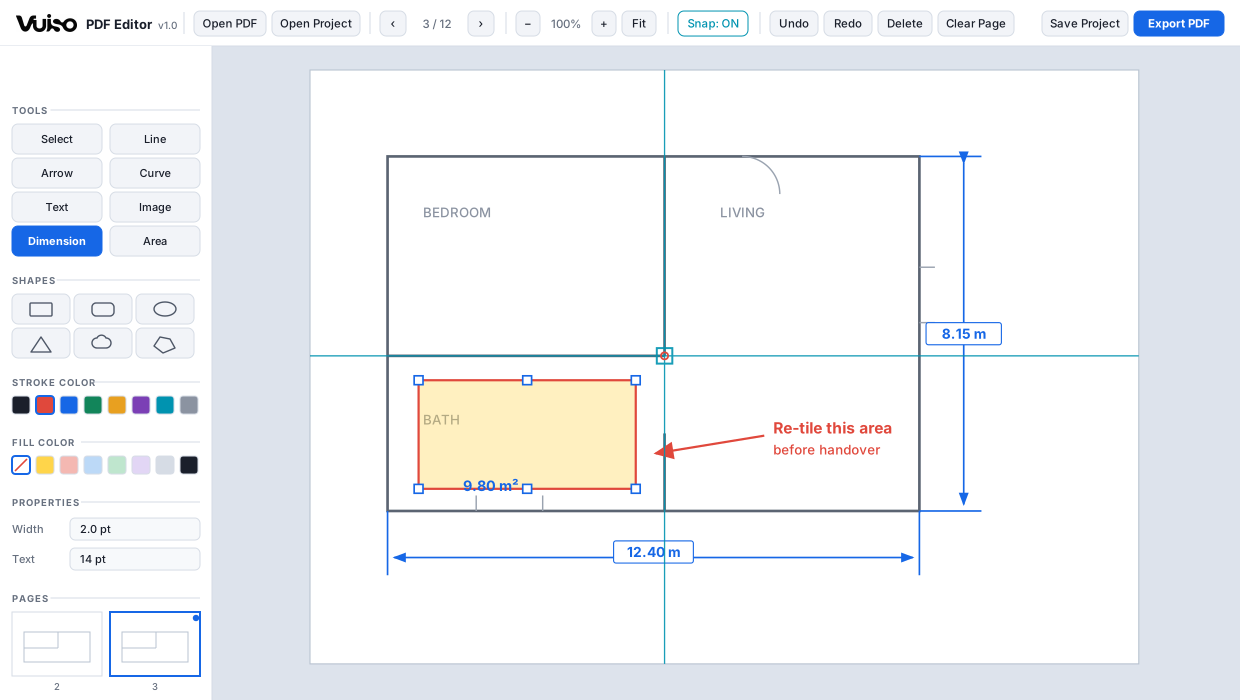
The Vuiso PDF Editor with a floor plan marked up with dimensions, a shaded area and a note

Tools, shapes, colours, page thumbnails and layers all sit in one left sidebar, so the drawing keeps the full width of the stage.

What it does

Built for drawings,
not just documents

Everything is drawn as vector and merged back into the original PDF, so it stays sharp at any zoom or print size, with labels that remain selectable, searchable text.

AutoCAD-style dimensions

Drag A to B, pull the dimension line out, then type the value and unit. Extension lines, arrowheads and label, done properly. Figures are always typed by hand. The program never invents a measurement from the drawing.

A magnet that grabs the PDF itself

Snaps to annotation corners, to any point along an edge, and, unusually, to the dark lines of the underlying drawing. Start a dimension exactly on a wall, not near it. The crosshair sits on the snapped point, so you see where the click lands before you press.

Lines, arrows, curves, text, images

Plus rectangle, rounded, ellipse, triangle, cloud and polygon, each with its own stroke colour, fill colour and 5 to 100% opacity, so a blue outline over light yellow shading keeps the drawing underneath readable.

Three typefaces, bold, italic, underline

Helvetica, Times or Courier, in any combination of bold, italic and underline, on notes, dimension labels and area labels. Restyle something already placed by selecting it first. All three are typefaces a PDF carries without embedding a font file, so the exported labels stay selectable, searchable text rather than a picture of text.

Real editing, not stamps

Select one or many: shift-click, Ctrl+A, or sweep a box (blue catches what is fully inside, green catches whatever it touches). Drag the blue points to reshape, hold Shift to lock straight, reorder in the Layers panel, copy and paste between pages.

Pages and layers in one sidebar

A scrollable thumbnail strip marks every page that already carries annotations. Thumbnails render in the background, whatever you scroll to gets drawn first, so a hundred-page drawing set opens instantly.

Save the markup, or export the PDF

Save Project writes a small .json of annotations and leaves the original PDF untouched. Export PDF shows a confirmation first, listing the source file, the annotation count and which pages are marked, and only then writes the merged file.
Privacy

Not a promise.
A wall the browser enforces.

Most free online PDF editors upload your file to somebody's server. This one cannot, even if it wanted to. The page ships with a Content-Security-Policy of connect-src 'none', which means the browser itself refuses to let it open a network connection.

Check it yourself: press F12, open the Network tab, and use the app all day. It stays empty. DevTools is left working and console errors are not suppressed, precisely so the claim stays testable.

<!-- inside the file, in plain sight -->
<meta http-equiv="Content-Security-Policy"
      content="connect-src 'none';
              form-action 'none';
              base-uri 'none'">

// DevTools → Network
// requests: 0
Keyboard

One key per tool

Esc always finishes what you are drawing and returns to Select. It never throws the work away.

V Select
L Line
A Arrow
C Curve
T Text
D Dimension
Q Area
P Polygon
I Image
1 … 5 Shapes
S Snap on / off
Shift Straight lock
Ctrl+Z Undo
Ctrl+Y Redo
Ctrl+S Save project
Ctrl+E Export PDF
Ctrl+C Copy
Ctrl+V Paste
Ctrl+A Select page
Ctrl+scroll Zoom
Get it

Vuiso-PDF-Editor.zip

Version 1.50.9 MBChrome or EdgeWindows, macOS, Linux

Launch without downloading Download
Inside the archive
One folder holding Vuiso PDF Editor.html (2.5 MB), HOW TO USE.txt, LICENSES.txt and the checksum file.
SHA-256 of the editor
17CC7259AA5F8C034E850E06603D4D2074D2DEB084256575A4C0945EABB5CBC6
Check it yourself
certutil -hashfile "Vuiso PDF Editor.html" SHA256
  1. Unzip and open Double-click Vuiso PDF Editor.html, or launch it here in the browser.
  2. Open a PDF Click "Open PDF", or drop the file onto the middle of the window.
  3. Draw Pick a tool, set stroke, fill and width, and mark up the page.
  4. Export "Export PDF" merges the markup into the original as vector.

To carry on editing later, use "Save Project" and keep the .json next to the PDF. Open the original PDF first, then "Open Project". Served over https the editor is faster than double-clicking the file, because pdf.js can start its real background worker.

Buy me a coffee

Vuiso tools are free and always will be. If one saved you time, a coffee helps keep them maintained.

QRIS payment code
QRIS, Gerbang Pembayaran Nasional
ARTRA DIGITAL KREASI

Works from any Indonesian banking or e-wallet app.