Your pictures never leave this device

Pictures in.
One PDF out.

Photos of receipts, a set of scans, screenshots for a report. Each picture becomes a page, in the order you arrange them, and you can see every page before you save it. Nothing is uploaded.

Version 1.0, one file, nothing to install
One picture, one page
Fit to picture, or A4
Phone photos come out upright
Works offline
vuiso.com/image-to-pdf/app
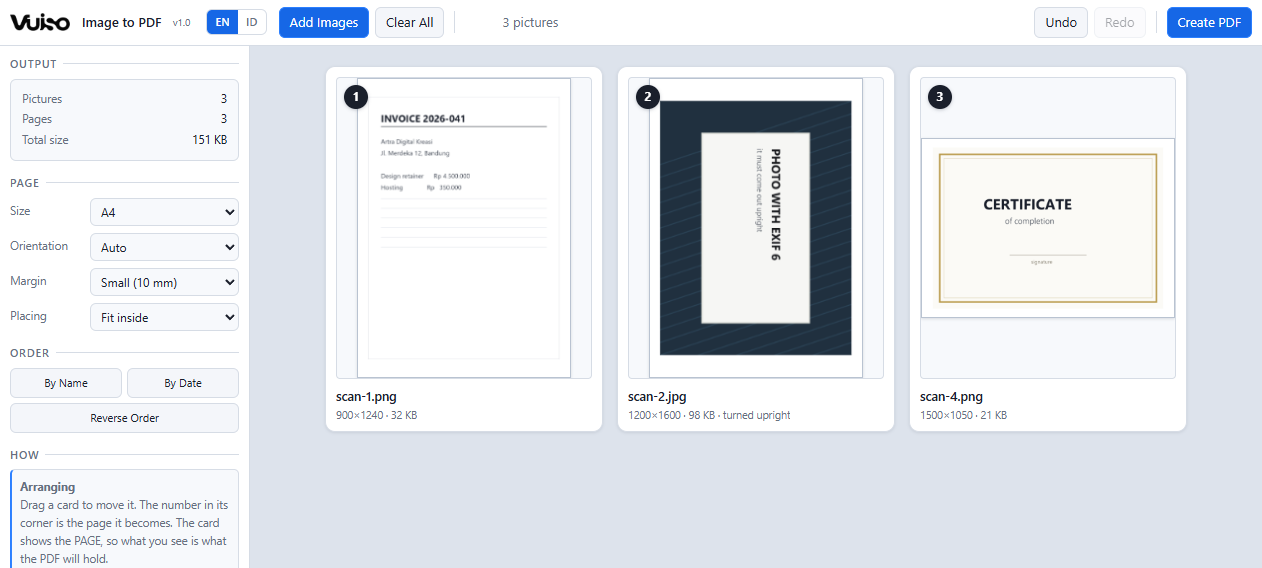
Vuiso Image to PDF showing three pictures as numbered cards, each drawn as the page it will become

Every card draws the page, not the picture: the same shape, the same margins, the same crop the PDF will have.

What it does

What you see on the cards
is what the file holds

The preview and the export are worked out by the same code, so a page cannot look one way here and come out another way in the PDF.

The card is the page

Each card draws the finished page: its shape, its margins, and the picture placed exactly where it will land. Change the page size or the margin and every card redraws, so you never save a file to find out what you asked for.

Your JPEGs go in untouched

A JPEG or PNG is embedded byte for byte, exactly as it came off the camera or the scanner. There is no second round of compression, so a tool meant only to stack pages cannot quietly cost you quality.

Phone photos come out upright

A phone stores a photo the way the sensor read it, with a tag saying which way up it belongs. A PDF cannot carry that tag, which is why photos land sideways in so many converters. Here the pixels themselves are turned, so upright on screen means upright in the file.

Fit to picture, or a real page size

Fit to picture gives every page the shape of its own picture: nothing cropped, no white bands. A4, Letter, Legal, A3 and A5 are there for when the result has to be printed or filed, with a margin in millimetres and your choice of fitting inside the page or filling it.

Order by dragging, or by name

Drag a card and a blue line shows where it will land. By Name reads the digits as numbers, so scan-2 comes before scan-10 - which is exactly where a plain alphabetical sort gets a scanned set wrong. By Date and Reverse Order are a click each.

Formats a PDF cannot carry

WebP, GIF and BMP are converted on the way in, keeping transparency where there is any, and the card says so underneath. Nothing is silently changed: a picture that was altered tells you it was altered.
Privacy

Not a promise.
Your pictures simply never leave.

Most free online converters send your files to somebody else's computer, then ask you to trust that they really were deleted afterwards. That is a lot to ask of a photo of your ID or your bank statement. Vuiso does not work that way. Everything happens inside your own device, exactly like opening a file in a program installed on your computer. Your pictures never leave your machine.

The easiest way to check: switch off your Wi‑Fi or unplug your internet, then use it as usual. Everything still works. A tool that quietly sends your file to someone else's server could not do that. As an extra safeguard, the page is locked down from the start, so your own browser blocks anything that tries to send data out.

When you use Vuiso

  • Your pictures are opened and processed on your own device
  • The PDF saves straight to your own folder
  • Keeps working with the internet switched off
  • No file is ever sent over the internet
  • No account, no email, no sign-in
  • No copy of your pictures on our servers
Keyboard and mouse

The moves worth knowing

Most of the work is dragging cards. The keys are there for the beginning and the end of it.

Ctrl+O Add images
Drag a card Move it in the order
↶ ↷ Turn that picture
Take it out
Ctrl+Z Undo
Ctrl+Y Redo
Ctrl+E Create PDF
Drop Add files from anywhere
Get it

Vuiso-Image-to-PDF.zip

Version 1.00.4 MBChrome or EdgeWindows, macOS, Linux

Launch without downloading Download
Inside the archive
One folder holding Vuiso Image to PDF.html (0.8 MB), HOW TO USE.txt, LICENSES.txt and the checksum file.
SHA-256 of the tool
E4224CB8D2597997731F722E8FA572249832A2854F74930CF22454EF7E7E6CAA
Check it yourself
certutil -hashfile "Vuiso Image to PDF.html" SHA256
  1. Unzip and open Double-click Vuiso Image to PDF.html, or launch it here in the browser.
  2. Add pictures Click "Add Images", or drop the files onto the page area.
  3. Arrange Drag the cards into order, turn any that need it, and pick the page size.
  4. Create PDF One picture per page, written straight to your Downloads folder.

This tool writes PDFs, it never opens one. To combine finished PDFs use Vuiso Merge PDF, to drop or extract pages use Vuiso Split PDF, and to turn pages that came in sideways use Vuiso Rotate PDF.

Buy me a coffee

Vuiso tools are free and always will be. If one saved you time, a coffee helps keep them maintained.

QRIS payment code
QRIS, Gerbang Pembayaran Nasional
ARTRA DIGITAL KREASI

Works from any Indonesian banking or e-wallet app.